Public beta · 2.0 Beta 19 · macOS 15+ · Apple Silicon & Intel

AudioCortex 2
Your sound library finally understands sound.

For twenty years, sample browsers have known your files by name. AudioCortex 2 knows them by ear. It listens, organizes, transforms — and it has an AI collaborator living inside it that can do all of that for you. A creative instrument that happens to have perfect memory.

Open the disk image and drag AudioCortex into Applications. If macOS says it can’t verify AudioCortex: open System Settings ▸ Privacy & Security, scroll down and click Open Anyway.

$99 during the beta, $149 at 1.0 · free for AudioFinder owners who bought in 2020 or later · seven-day trial · no subscription, ever.

▶ Watch the 60-second tour on YouTube

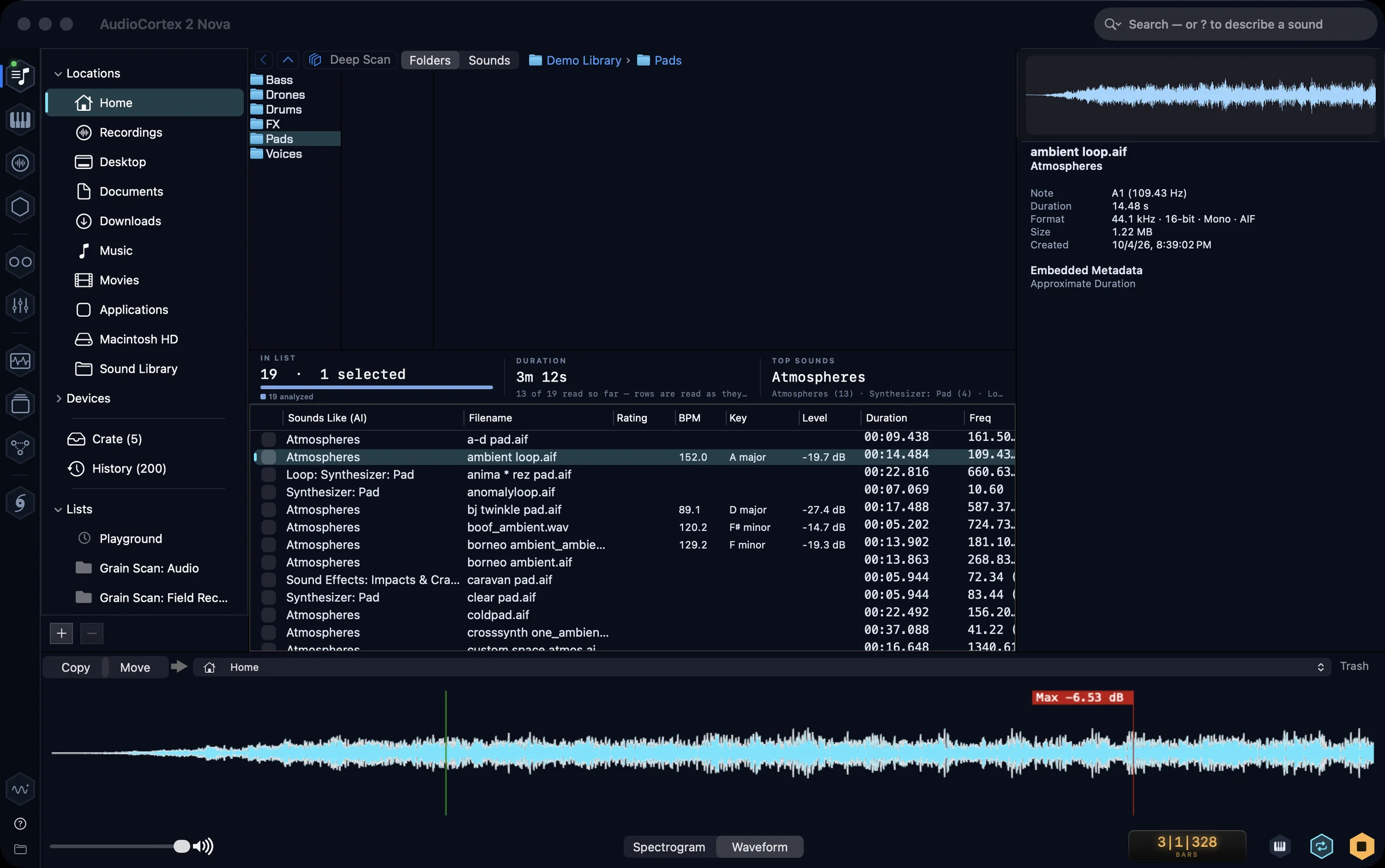
The AudioCortex 2 Library: a folder of pads, every sound analyzed, with what each one sounds like, its tempo, key and level
The Library: every sound listened to, and found by what it sounds like.
Hear it

Halloween Pulse

Rainawave · made with AudioCortex 2

▶ Watch on YouTube
Watch

Above the Clouds

Rainawave · made with AudioCortex 2 · visuals made with AI video tools

Eleven rooms. One window.

The sidebar is the order of the work: find material, play, build, watch. A green dot says where the sound is coming from.

Find material · Library

A library that knows what things sound like.

Browse, audition and tag hundreds of thousands of sounds; see any one as a waveform or spectrogram and edit it in place. Type ? and describe a sound — "something dark and metallic" — and it finds what sounds like that, whatever the file is called. Select a sound and ask for more like it.

The AudioCortex 2 Library: a folder of sounds with the selected one shown as a waveform, categories and ratings in the list
The assistant · Oscilla

An AI that actually operates the app.

Oscilla lives in every room. Ask it to find a lush guitar, stretch it into a cathedral, lay it on a track and bounce it — and it does the work, tool by tool, in front of you. Use your own Claude or Gemini key, your own model server, Apple’s on-device model, or Oscilla Local: Iced Audio’s own model, downloaded once, running entirely on your Mac with no key and no account.

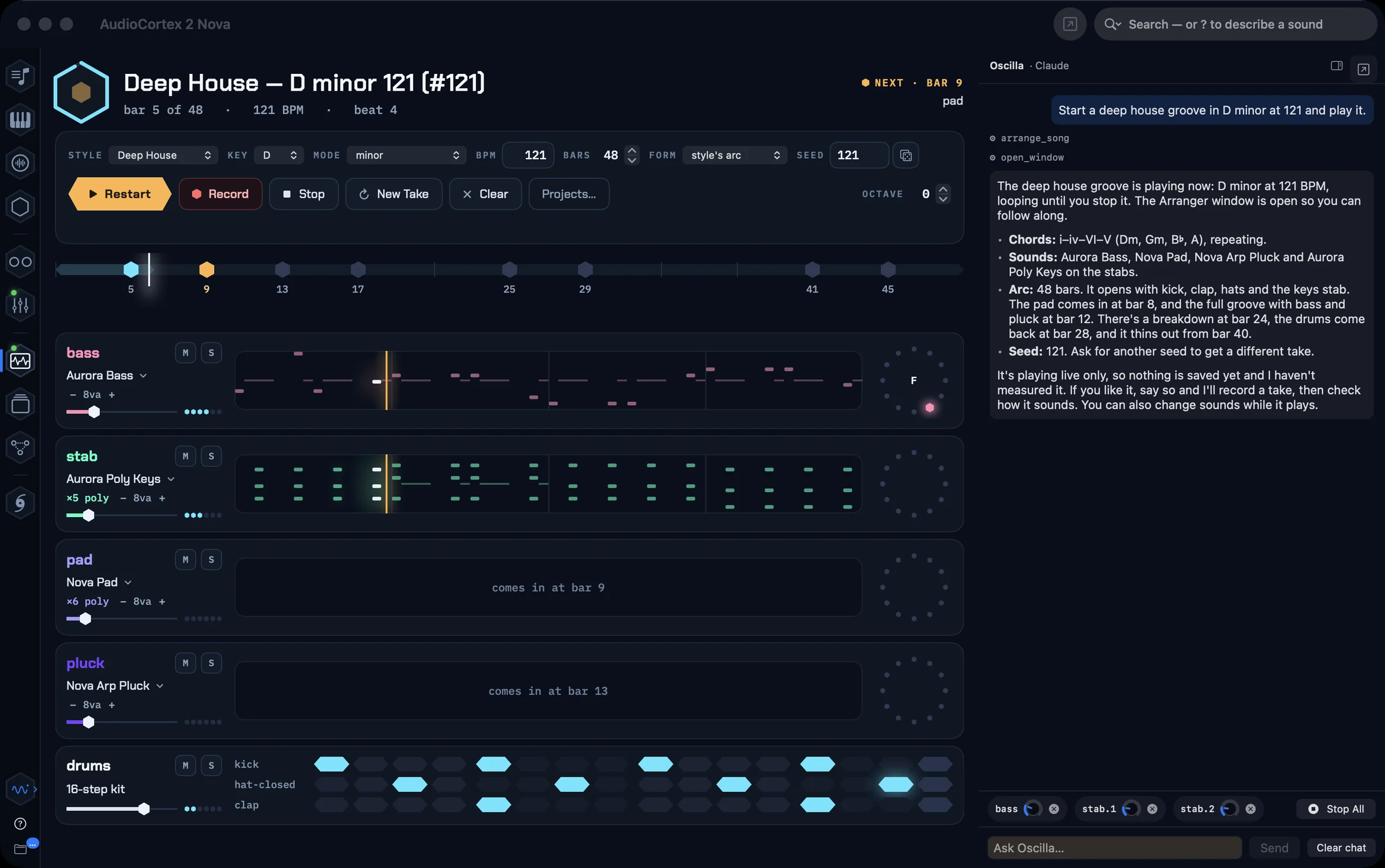
Oscilla’s pane beside the Arranger, carrying out a request for a slow techno groove step by step
Play · Arranger

Ask for a song. Hear it played, live.

Pick a style, key, tempo and length — or describe it — and the Arranger writes sections, parts and chords and plays them on the built-in synths, bar by bar, with the drums on their kit. Mute or solo a lane, swap its sound, shift its octave, change the style while it plays. Record a take and it lands in Tracks as stems, ready to mix.

Play · Instruments

A drum machine and a synth, built in.

A 16-step drum machine with kits made from real drums, and a synth with wavetable, analog and FM voices — oscillators, filter, envelope, a hexagonal keyboard. Drop your own samples into a kit folder and they are a kit. You are never starting from an empty library.

Play · DJ

Two decks that know the tempo and the key.

Load any two tracks: tempo and key are read, beatgrids drawn, and Sync locks one deck to the other. A crossfader, a level and a speed fader per deck, cues, crates. The waveforms scroll as the music plays — and Oscilla can pull the next track for you.

Build · Tracks

Lanes, a mixer, and your plug-ins.

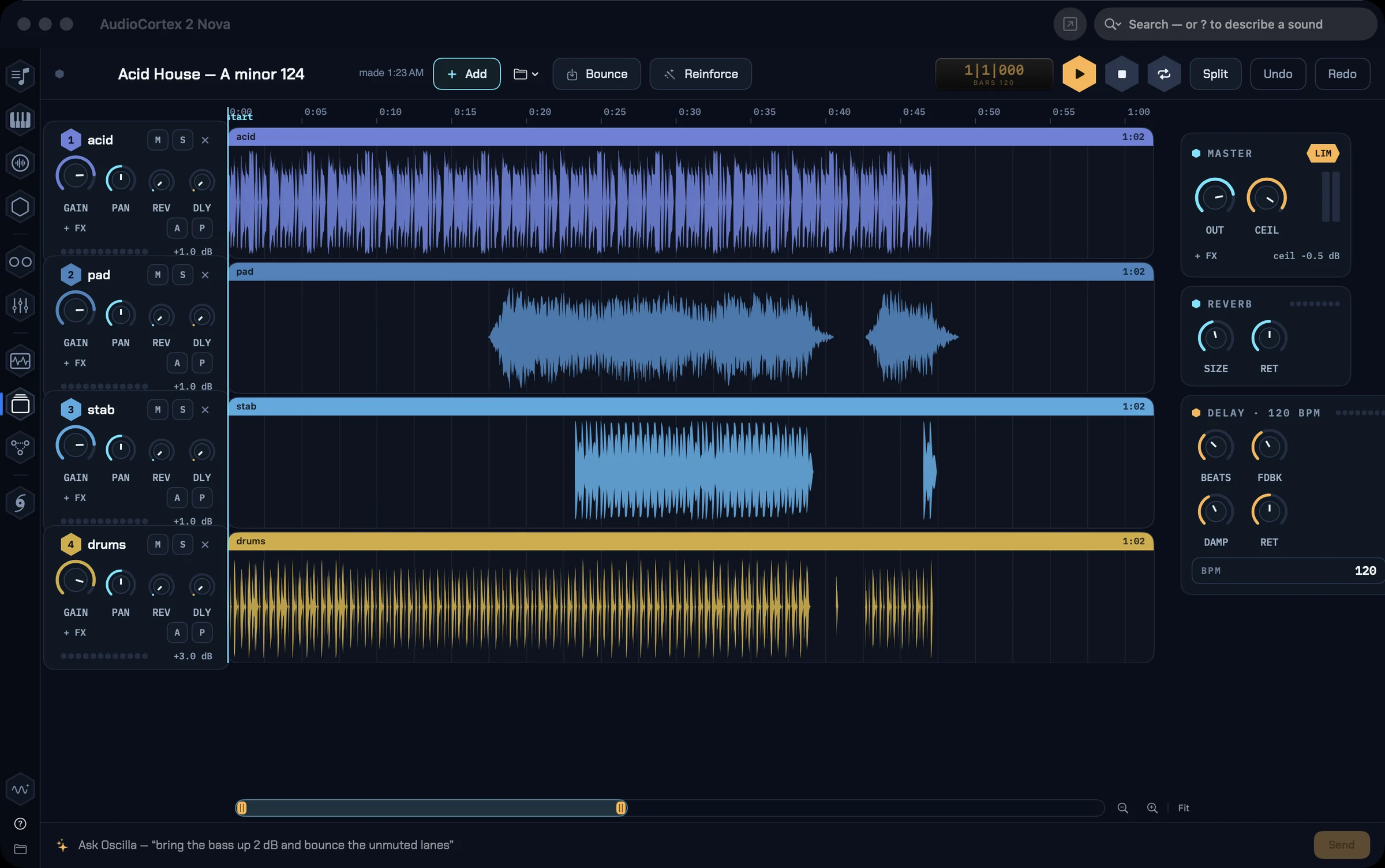
Layer what you make and what you find. Every lane has a channel strip — gain, pan, sends, inserts with the built-in effects or any AudioUnit, in its own window with its own presets — and a master with a limiter. Bounces add up as you build a song a part at a time. A project keeps the whole take: sounds, lanes, stems and mix in one package.

The Tracks room with a project’s lanes, each with a mixer strip, and the master at the right
Build · Nodes

Wire sounds through engines like a modular rig.

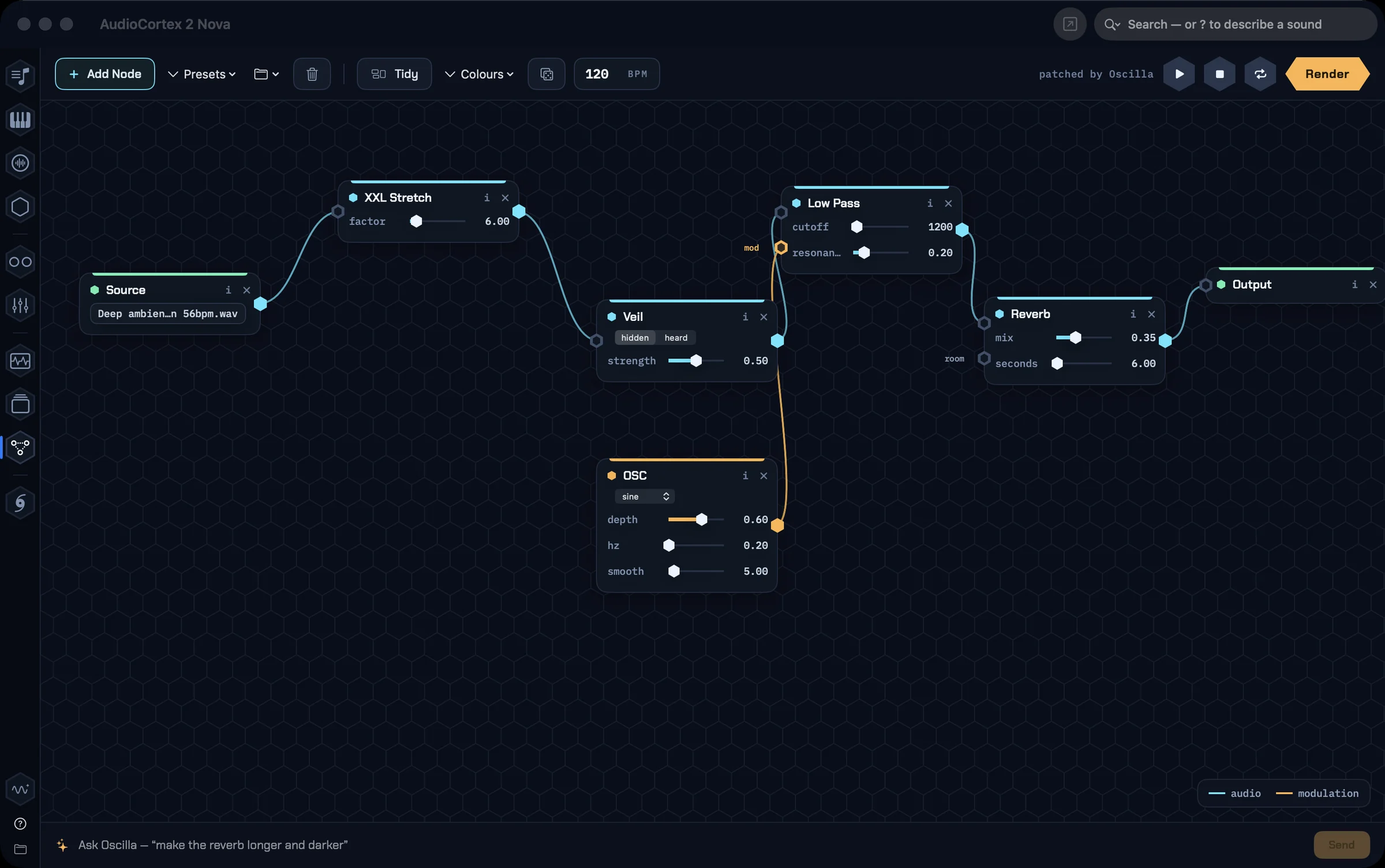
A patchable canvas: a source file through Veil, into a reverb, out to a file. Every texture engine and effect is a node. Save patches, load them again — or ask Oscilla to wire it for you.

The Nodes canvas with a source wired through a Veil node and a reverb to the output
Watch · Spiral

Harmony you can watch.

The pitch spiral listens to everything the app plays. Chords bloom as constellations, drones burn as a single spoke, detuning smears off-axis.

Watch · Phylo

Your whole library, laid out by likeness.

The Phylogenetic Explorer classifies your sounds and arranges them as a hex map — kicks beside kicks, pads beside pads, the words on the hexes saying what lives there. Click to dive in, play what you find, record what you play.

The Phylogenetic Explorer one level into a library of 129 sounds: a honeycomb of hexes — Percussion, Atmospheres, Sound Effects, Synthesizer, Bass, Vocals, Mallets, Keyboards — each with its count
Find material · MIDI

MIDI, read like audio.

A MIDI library that reads every file for tempo, meter, key, feel and parts, and spells out its first chords. Search for bass lines in F# around 160 BPM; open any file as a piano roll; play it on a sound of your choice, or hand it to a song.

The MIDI Library with files listed by tempo, key and feel, and the selected file as a piano roll
Find material · Sounds

Every preset, every kit, auditioned.

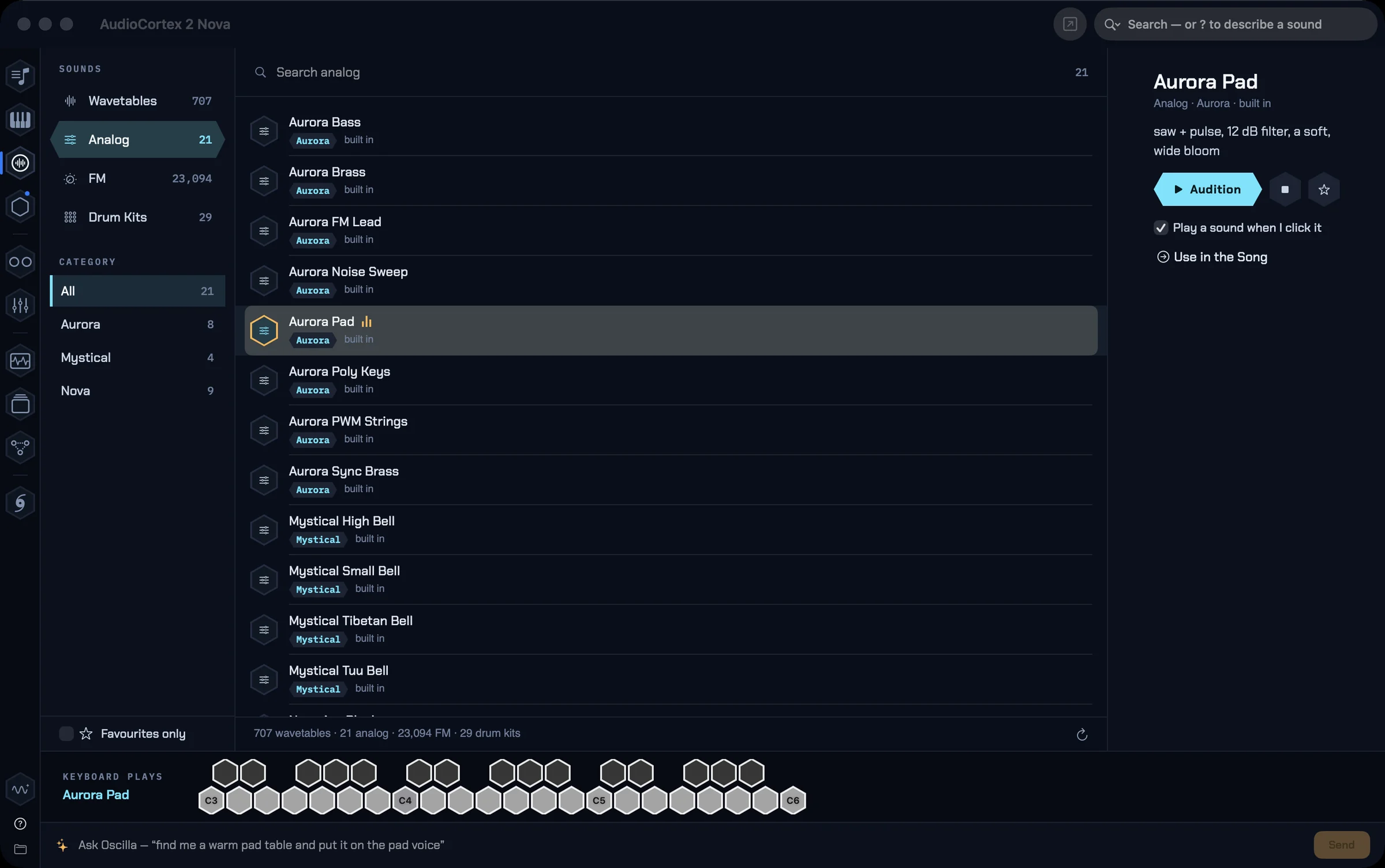
Wavetables, analog and FM presets, drum kits — browse them, play them from the keyboard, favourite them, and send one to the song with a click.

The Sounds room listing analog presets with the selected one playable from the keyboard below

A furnace of texture engines.

This is where AudioCortex 2 stops being a browser and becomes an instrument. Every engine is a tool Oscilla can use, a node you can patch, and a command you can run on a selection.

XXL Stretch

Time-stretch 2× to 200×. Transients dissolve; a guitar strum becomes a twenty-minute glacier. The engine behind the Monolith and Aquaphoria pieces.

Lush Stretch

The layered stretch measured from the records we love — a few seconds of guitar becomes a slow, wide cloud that keeps its chords.

Mosaic

Rebuild any sound out of grains of another sound. Paint a melody in whale song.

Convolution — where the hall is anything

The impulse response can be a bell, a choir, a mosaic — so your material rings inside other material. The library becomes the room.

Spectral suite

Crossing, Freeze, Morph, Veil, Sediment, Wavesets, Ascension, Widen, Resonate. Clean-room spectral processing from the electroacoustic canon, rebuilt in fast native Swift.

Reinforce

Point it at a stem pack or a finished track: it reads the tempo map, the pattern and the chords, and plays reinforcement under it on the built-in instruments.

Our promise: AudioCortex is not an AI music generator.

Many AI music generators are trained on other artists’ songs without permission and make variations of their music. AudioCortex doesn’t do that, and never will. No AI makes the audio: every sound comes from your recordings or from the synthesizers and effects you control.

— Iced Audio

Pricing

AudioCortex 2 · beta & early buyers
$99intro · $149 at 1.0
  • One licence, up to three of your Macs
  • Every beta and the 1.0, included
  • Code by email within a minute of paying
  • No subscription, no account
Buy AudioCortex 2 →
AudioFinder owners · 2020 or later
Free
  • Paste your AudioFinder code into AudioCortex 2
  • It becomes an AudioCortex 2 licence on the spot
  • Lost it? Re-send it to yourself
↓ Download and upgrade

Open the disk image and drag AudioCortex into Applications. If macOS says it can’t verify AudioCortex: open System Settings ▸ Privacy & Security, scroll down and click Open Anyway.

AudioFinder Classic
Still here
  • No longer sold — AudioCortex 2 is its successor
  • Still available to download; your code keeps working
  • Owners from before 2020: the intro price is yours too
AudioFinder Classic →

Questions

Is the beta free to try?
For seven days. Download it and everything is yours for a week — every room, every engine, Oscilla; the app tells you the day it ends. After that it opens only to Activate until a code is in. A licence code registers it on up to three of your Macs.
What does it need?
macOS 15 (Sequoia) or later. Apple Silicon is where it is fastest; Intel Macs are supported. Oscilla Local, the built-in assistant model, is a separate 2.5 GB download and is best on Apple Silicon.
macOS says it can’t verify the app.
AudioCortex 2 is signed and notarized by Apple, but macOS can still be cautious the first time you open it. Open System Settings ▸ Privacy & Security, scroll down and click Open Anyway, then open AudioCortex again. You only do this once.
Does AudioCortex use generative AI?
Not for music. Nothing in AudioCortex generates audio. Oscilla, the assistant, helps you find sounds and operates the app; every sound comes from your recordings or from the built-in synthesizers and effects.
Does Oscilla need an account?
No. Five options, your choice: a Claude key or sign-in, a Gemini key, your own model server, Apple’s on-device model, or Oscilla Local, which needs no key and runs entirely on your Mac.
I own AudioFinder. What now?
Bought it in 2020 or later? AudioCortex 2 is yours free: paste your AudioFinder code into AudioCortex 2’s activation window and it migrates. Bought it earlier? Thank you for the years — the intro price is for you too. AudioFinder itself stays available to download on the Classic page and your code keeps working.
How do updates arrive?
In the app. AudioCortex ▸ Check for Updates… — betas arrive as they ship, with notes.
Subscription?
No. Never. One purchase, one code, your Macs.

AudioCortex 2 is a sound library that listens, an effects rack that dreams, and an AI collaborator that does the work — in one native Mac app.

Open the disk image and drag AudioCortex into Applications. If macOS says it can’t verify AudioCortex: open System Settings ▸ Privacy & Security, scroll down and click Open Anyway.

2.0 Beta 19 · macOS 15 (Sequoia) or later · support@icedaudio.com